California Youth Leadership Council Resources

What is a Website?
A Website is a collection of webpages. It should reflect your ability to create and design your own interactable software. It's perfect for students who like to use technology to connect text, pictures, and analysis together into an easy to navigate page.
Rules
General rules for a website include:
-
Your website must be an original creation
-
Your website must correctly portray your historical evidence
-
Your website much include your analysis
-
Your website must be created with the NHD website editor
-
Your website must not exceed a word count of over 1,200
-
You must have access to the internet and all needed software to create and design your website
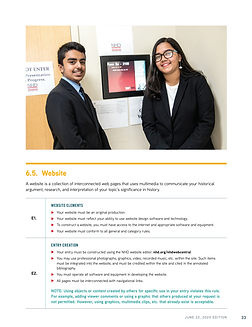
Website Rule Book
Website Organization Tool


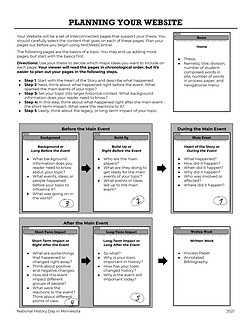
Website Planning Template

Website Planning Map
Visit the following resources to help create your Website!
Website Judging Rubric
Where to Start
A step-to-step guide on how to start creating your website!
1. Gather your research - collect your primary and secondary sources needed to get the full picture of your topic. This is where you should become an expert on your topic! Journal, newspaper, and some website articles are a great source of primary sources, and can help give you the perspective of the public's view of your topic! Websites and books are great secondary sources that summarize your topic!
2. Gather your media - collect all the pictures and quotes that you will want to use in your website! These can include images from the event, of the person, etc. They often are spread out throughout your website, so make sure you have enough!
3. Write and revise your thesis - make sure that you have a strong thesis that connects to the theme. Your thesis will have a separate page on your website. (If you want more information on how to write a strong thesis, click here)
4. Format your website - create and outline for your website. Figure out what information you want to include, and which pages you want to include it in.
5. Create an NHDWebCentral account - if you don't have an existing account, create one here. (Need help creating an account or website? Click here.)
Tips
1. Balance text, quotes, and visuals
Know how to balance student-composed words, quotes, images, and videos so you don’t end up with large blocks of only text or only quotes. This keeps your website visually appealing and easier to read.
2. Prioritize readability above everything else
If judges can’t easily read, navigate, or understand your site, they can’t judge your project well. Use clear fonts, good contrast, logical spacing, and intuitive navigation.
3. Use strong and consistent visual design
Choose visually aesthetic and consistent colors throughout your website. Add images that stand out, quotes from multiple perspectives, and visuals that directly relate to your topic to capture attention.
4. Clearly distinguish student writing from quotes
Make it visually obvious what is student-composed and what is quoted material by using formatting such as bolding, colored boxes, outlines, or different styles.
5. Learn how to use NHDWebCentral tools
NHDWebCentral can be buggy and frustrating at first, but once you understand the tools and features, you can create creative and polished website designs. Take advantage of the available templates to give your website a clean, professional foundation.
6. Study example websites for inspiration
Look at past winners’ websites, teacher-provided examples, classmates’ projects, or other sample sites to get ideas for layout, formatting, color schemes, and overall structure.
7. Organize pages in chronological order
Website pages are often most effective when organized by what happened before the event, what happened during the event, and the short-term and long-term impacts.
8. Use a clear and logical page structure
A common and effective format is Home, Thesis, Context, What Happened, Short-Term Impacts, and Long-Term Impacts, with additional pages added to expand on specific topics.
9. Connect every page to your argument
Make sure each page has a clear, direct message that supports and reinforces your overall thesis.
10. Use multiple types of media
Incorporate text, images, audio, and video. Be creative and experiment with design while keeping everything readable and purposeful. Videos make your topic easier to visualize and more interactive. Use movie clips representing your topic, educational videos, or actual historical footage if available.
11. Include interactive features
Use navigation buttons, videos, and timelines to engage viewers. Timelines can be created using outside tools if needed.
12. Use images frequently and strategically
Images improve visual appeal and help explain complex ideas more clearly.
13. Cite images correctly and clearly
Place image citations at the bottom using image title, author or website name, and year. Image citations do not count as student-composed words.
14. Use theme words intentionally
Incorporate NHD theme words such as Revolution, Reaction, and Reform into your student-composed writing, and bold or highlight them so judges clearly see the connection.
15. Include underrepresented perspectives
Strengthen originality by including less frequently discussed viewpoints, such as interviews or perspectives often left out of traditional narratives.
16. Seek out unique primary sources
Look for primary sources such as songs, speeches, campaign materials, letters, diary accounts (especially from workers), and newspapers.